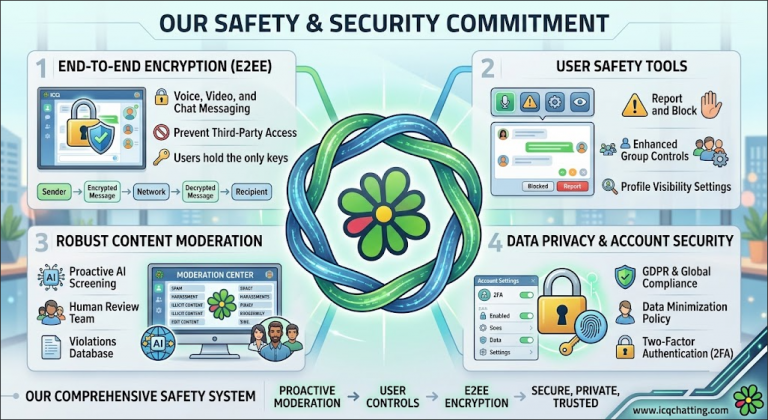
Your Safety on ICQ Chat Network
At ICQ Chat Network, your safety and well-being are our top priorities. We are committed to providing a secure, respectful, and enjoyable environment for everyone who joins our community. Whether you’re here for casual conversation, random video chat, or building lasting friendships, you deserve to feel safe and protected. This page outlines the policies, tools, and procedures we have in place to safeguard your experience.
⚠️ Important: If you are under 15 years old, you are not permitted to use ICQ Chat Network services. This policy is strictly enforced. Please see the Age Policy section below for more details.
Our Commitment to Safety
Our goal is to provide a pleasant atmosphere for people to enjoy socializing in an online chat environment. To make this possible, we have established clear rules and restrictions to avoid violations of generally accepted laws and codes of conduct, and to protect our services and those who use them.
When necessary, these rules are enforced across all services we offer, including chat rooms, forums, gallery pages, and our helpdesk systems. Violations may be dealt with in a variety of ways, ranging from warnings up to and including a permanent ban from the network.
Acceptable Use Policy (AUP)
By entering or using ICQ Chat Network and its services, you are consenting to be bound by our Acceptable Use Policy. The following are key guidelines:
General Behavior
- Respect Others: Do not insult, harass, or despise the network or its operators. If you don’t like it here, you don’t have to be here—but don’t sit and post insults.
- No Disruptions: Arguing about bans or being on restriction lists is considered a disruption. You may discuss such situations with an IrcOp via the #Help room or by submitting a ticket on the Support Desk.
- Ask If Unsure: If you are unsure whether something you want to post is acceptable, please ask the Moderator (ChanOp) on duty or ask in our #help channel.
- No Ban Jumping: If you are banned in a channel and repeatedly “jump” that ban to reconnect, you may be banned from the entire network.
Use & Abuse of Services
We provide services like NickServ, ChanServ, HostServ, and MemoServ to support our community. Abuse of these services is not allowed. This includes:
- Registering multiple nicknames for the purpose of “collecting” so others cannot use them, or for “squatting” (filling up a channel with idle nicknames)
- Registering an excessive number of channels that you cannot properly administrate, or for preventing others from registering them
Channels
We have a variety of “public” channels administered by network operators. We also allow chatters to open their own “private” channels, which they are allowed to moderate themselves.
Age Policy
🚫 We do not allow children under 15 years old to use ICQ Chat Network services. This is strictly against our policy—not even with adult supervision. If discovered, they should be reported to the network Ops Team so they are immediately removed and their account(s) closed.
If you allow your child who is 15 or older to use our services, you are agreeing to the Acceptable Use Policy on their behalf as well.
Bot Policy
ICQ Chat Network does allow chatter-owned bots, as long as they and their owners comply with our Bot Policy. The following rules apply:
- Compliance: Bots must act in accordance with the Acceptable Use Policy, just like any other user. They can be warned, kicked, and banned if they violate any rules.
- Registration: Both the bot AND the owner must be registered with NickServ. The bot must have a separate account registered with a valid email address.
- Owner Presence: The bot owner must be present in the channel if the bot is in a Public Network Channel.
- Identification: It must be obvious who the owner of the bot is.
- Contactability: The bot owner must be contactable and must respond promptly to network admins.
- Purpose: Every bot must serve a purpose. A bot with no function is considered a filler and is prohibited.
- Limit: No more than FIVE (5) bots in private channels.
- Restricted Areas: Bots are prohibited in Network game rooms such as Uno or Trivia rooms.
- Bans: Bans set on a bot’s owner (such as Ban On Site) also apply to the bot until the ban expires.
Reporting & Complaints Procedure
If you experience or witness any behavior that violates our policies, we encourage you to report it immediately. Here’s how:
Step 1: Visit #Help
Visit the #help channel on the network. There is almost always an active op, Bot Op, or Admin available to assist you.
Step 2: Submit a Helpdesk Ticket
If no one is available or you prefer a formal record, contact the helpdesk. Simply open a ticket, and we will reply to you within 24 hours.
Step 3: Complaints About Moderators
If your complaint is regarding a Moderator, contact the Chanops Lead or the Chanops Lead Back up. You MUST ensure you have logs to back up your complaint—genuine logs are essential.
✅ We take all complaints seriously. Our team investigates every report thoroughly and takes appropriate action to maintain a safe environment for everyone.
Moderation & Enforcement
Our network is managed by a dedicated team of administrators, IRC operators, and channel operators who work around the clock to keep our community safe.
- Chanops Rules: Our Chanops must read and adhere to specific rules, just like our chatters.
- Enforcement: Violations may be dealt with in a variety of ways, ranging from warnings up to and including a permanent ban from the network.
- Security Measures: The network runs security scanners to maintain safety and prevent abuse.
Data Security & Privacy
We take your privacy seriously. Our platform includes advanced security features:
- Secure Connections: We support SSL connections for encrypted communication.
- Password Protection: Advanced password hashing keeps your account credentials secure.
- Nickname Protection: NickServ ensures your registered nickname is protected and cannot be used by others.
Tips for Staying Safe
While we do everything we can to protect you, your safety also depends on your own actions. Here are some tips:
- Protect Your Identity: Never share personal information like your full name, address, phone number, or financial details with strangers.
- Use a Strong Password: When registering your nickname, use a unique and strong password.
- Report Suspicious Behavior: If someone makes you feel uncomfortable, report them immediately using the procedures above.
- Be Aware of Scams: Be cautious of anyone asking for money or offering deals that seem too good to be true.
- Trust Your Instincts: If something feels off, it probably is. Disengage and report.
Join Our Safe Community
Your safety matters to us. We are committed to maintaining a welcoming, respectful, and secure environment for everyone. If you have any questions or concerns, don’t hesitate to reach out. Come join us at https://www.icqchatting.com and experience a safe chat community!
ICQ Chat Network – Safe, secure, and built for you.